Every HVAC system in your town has a clock. Now you can read it.
AI reads the city permit on every home’s heating and cooling system, works out how old each one is today, and shows you which homes just crossed 12 years and which turn 12 this year.
Then it finds the local HVAC contractors who will pay you every month to reach those homes first, and the owner’s phone and email for each one.
One payment. Hosted software. Nothing to install.
A Birth Certificate Nobody Reads.
Every furnace, air conditioner and heat pump that goes into a home leaves a record. A contractor pulls a permit, and the city writes down the address, the work and the date.
That date is public. It sits in the city’s permit records, one line per job, going back years. In a lot of cities it goes back to the early 2000s.
And it quietly answers the one question every HVAC contractor in town would pay to know: which homes are due next?
Contractors do not read it. They are in attics and on rooftops all day, and their phones ring when something breaks. Most marketers do not read it either. They are running the same ads as everyone else, on the same hot days. So the date just sits there, and the clock keeps ticking.
The clock started the day the permit was filed. Nobody has been reading it. That is the whole opportunity.
“How Old Is Your Furnace?” “Um.”
Somewhere near you there is a couple who bought their house in 2016. The inspection report said the heating and cooling was “original, functioning.” Nobody wrote down a year. They never thought about it again.
Every so often a flyer comes. “Spring tune-up special.” “Is your AC ready for summer?” Same words, every company, every year. They go straight in the bin, because none of them say anything about this house.
Ask them how old their system is and you get a pause, then a guess. The real answer has been on file at city hall the whole time.
Now picture a card that starts with their own record. From a local company, with a name, a license number and a fixed-price system check. That is the first piece of HVAC mail that has ever been about their house. That is the card that stays on the fridge.
Illustration of the fields on a home card. Real cards show the filed, issued and completed dates and the permit wording as the city recorded them.
The HVAC Clock.
Most lead tools look for something that just happened: an ad click, a new permit, last night’s heatwave. Everyone is racing for those. This one looks at a date that was set twelve years ago and is only now coming due. Nobody is racing for it, because nobody else is reading it.
Read the heating and cooling permits for any town
Type a city, ZIP or address and pick a system age. HVACSignal AI reads the HVAC permits the city has published for that place while you wait, usually a minute or two.
Keep the newest replacement at each address
A house that got a new system in 2012 and another in 2023 has a three-year-old system, not a fourteen-year-old one. A newer change-out resets the clock. Get this wrong and you tell an owner with a brand new unit that theirs is old, which is the fastest way to lose a client’s trust.
Separate change-outs from repairs
The permit reader keeps real replacements: a new condenser, a furnace swap, a like-for-like change-out, an upgrade to a heat pump, even vague wording like “Mechanical General Installation”. It drops recharges, thermostat swaps, service calls and work that is not HVAC, because a repair does not reset the clock.
Put every home on the Clock
Each home gets an age, a zone and its source permit: filed, issued and completed dates, and what the permit says. Sort oldest first. Save the ones you want. They stay saved, even when the search is refreshed.
A newer system. Nothing is about to break.
Mid-life. Tune-ups, repairs and service plans.
Crossing into the Cliff right now. Reach these owners first.
Near the end of its working life. The best change-out homes in the area.
Why it becomes a retainer, not a list
Every month another batch of systems in the same town crosses 12 years. Every January a whole year of permits moves up a zone. The list refills itself on a calendar, and on the 1st of every month each buyer gets a fresh pack: the HVAC Clock audit and their Cliff, Watch and Reset lists. That is what you charge for monthly.
You Don’t Log In To A List Of Homes. You Log In To The People Who’ll Pay For It.
Every lead tool ever sold has the same hole in it. You get the data. You look at the data. And the very next thought is “right, so who do I call?”
So Find buyers sits right under the search. Pick who you want to sell to, HVAC contractors, plumbing and heating firms, home inspectors, warranty companies, and where: near one of your searches, or any city or state. You get local businesses with their stars, reviews, distance, phone and website.
Save the ones you like. My buyers gives every one of them a stage, To call, Called, Pitch sent, Meeting, and on to a paid deal, and logs every call with the next step and the date.
The Six-call playbook tells you who to call first, the opening line, and the answers to the objections you will hear. Each buyer card carries the number to say on the call: how many homes in their area are 12 years and up.
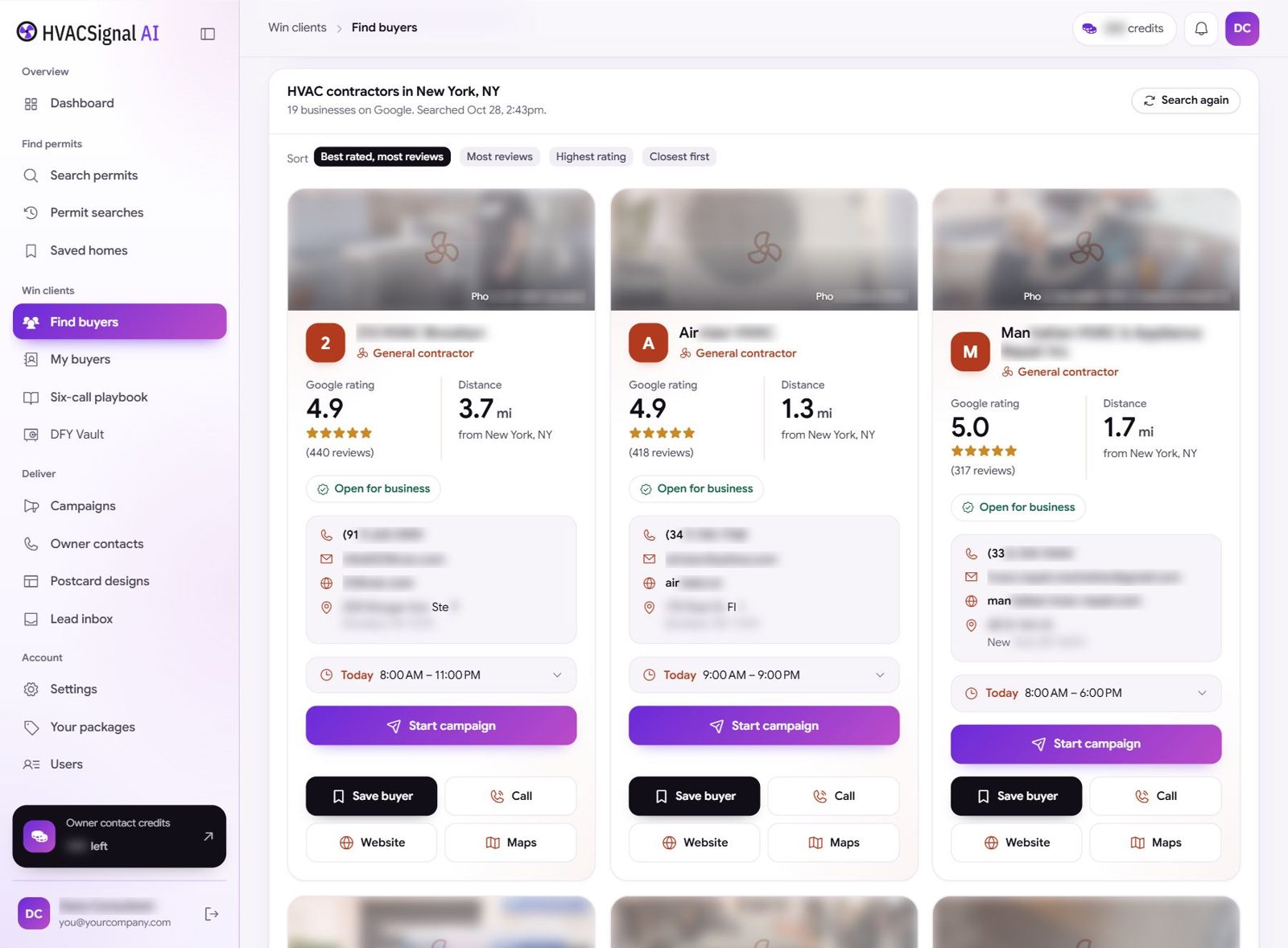
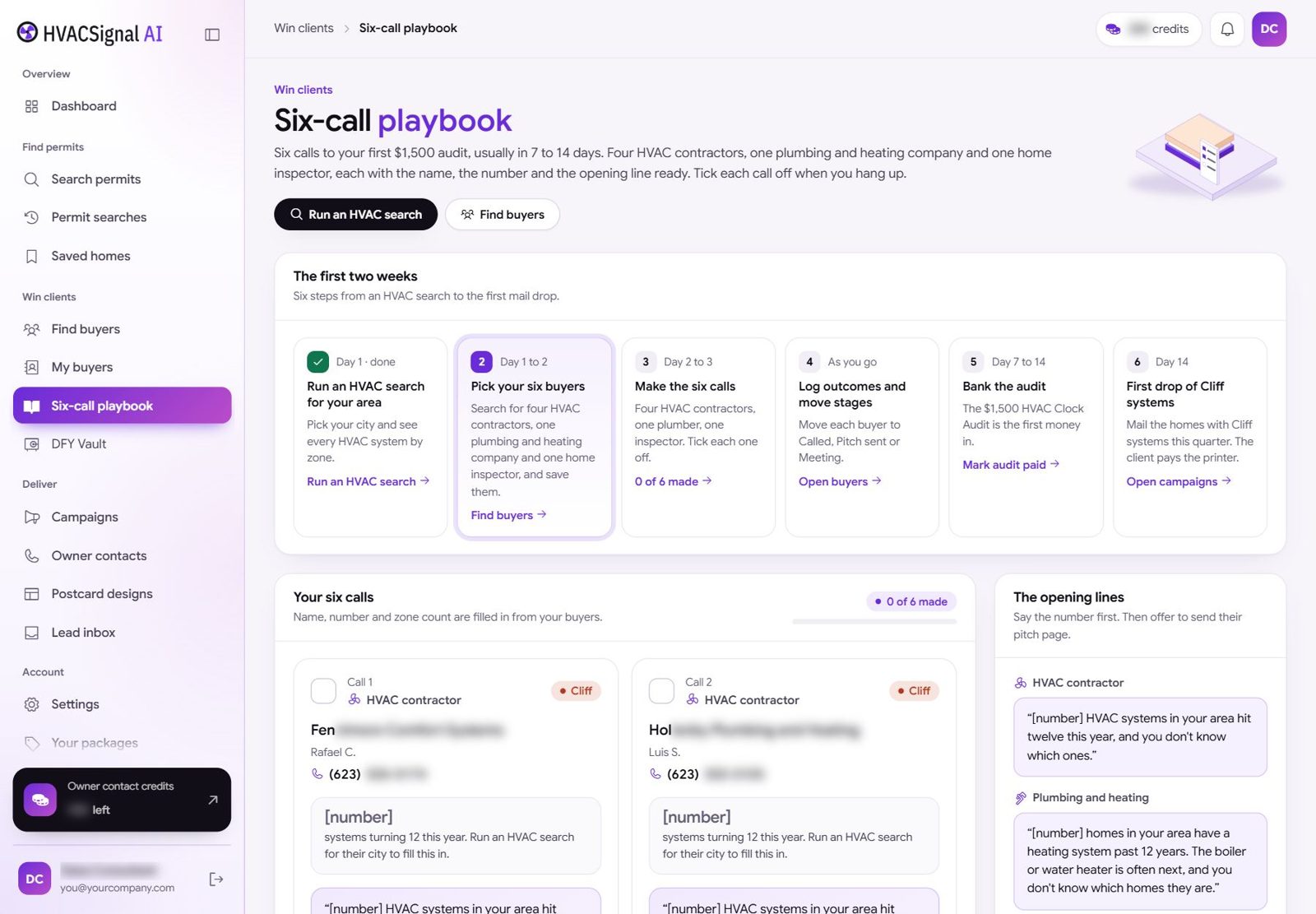
Find buyers runs on your own Google Places key, added once in Settings. Guide 07 shows every click, and new Google Cloud accounts often get free credit first.
The Owner’s Phone And Email, Already Checked.
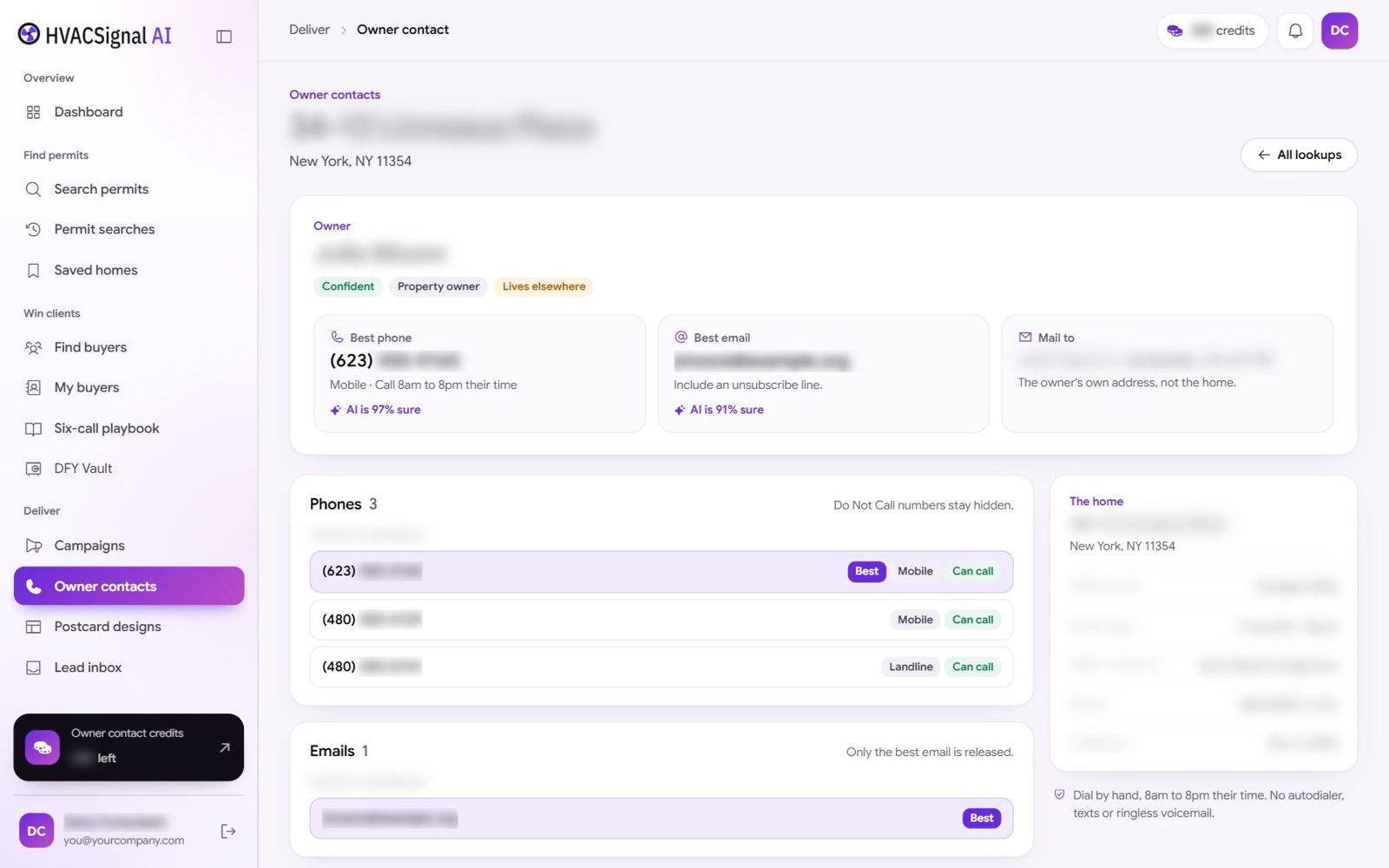
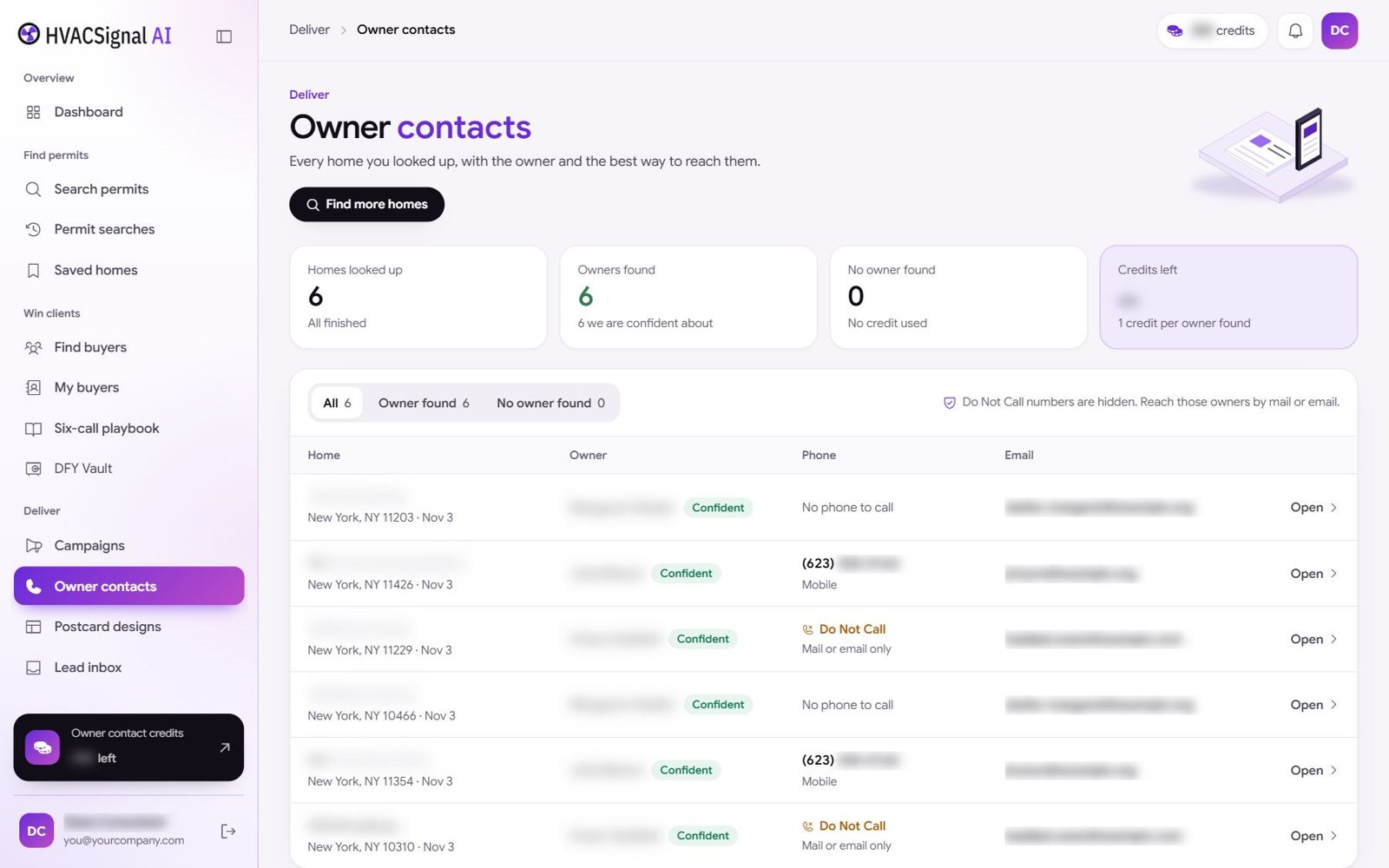
An address gets a postcard. A contractor wants a conversation. So every saved home has a Get owner details button. Most lookups finish in under 30 seconds.
You get the owner’s name, and whether they are the owner or need checking first. The best phone, and the hours you may call it. The best email, with an AI pick that shows how sure it is.
One credit, only if an owner is found. No owner found, no credit used. Every owner you find lands in Owner contacts, with totals for found, not found and credits left.
- Do Not Call numbers are struck out and never shown as callable
- Known litigators are flagged, and exports carry the same flags
- Personal data is encrypted at rest
One Real City. One Real Search.
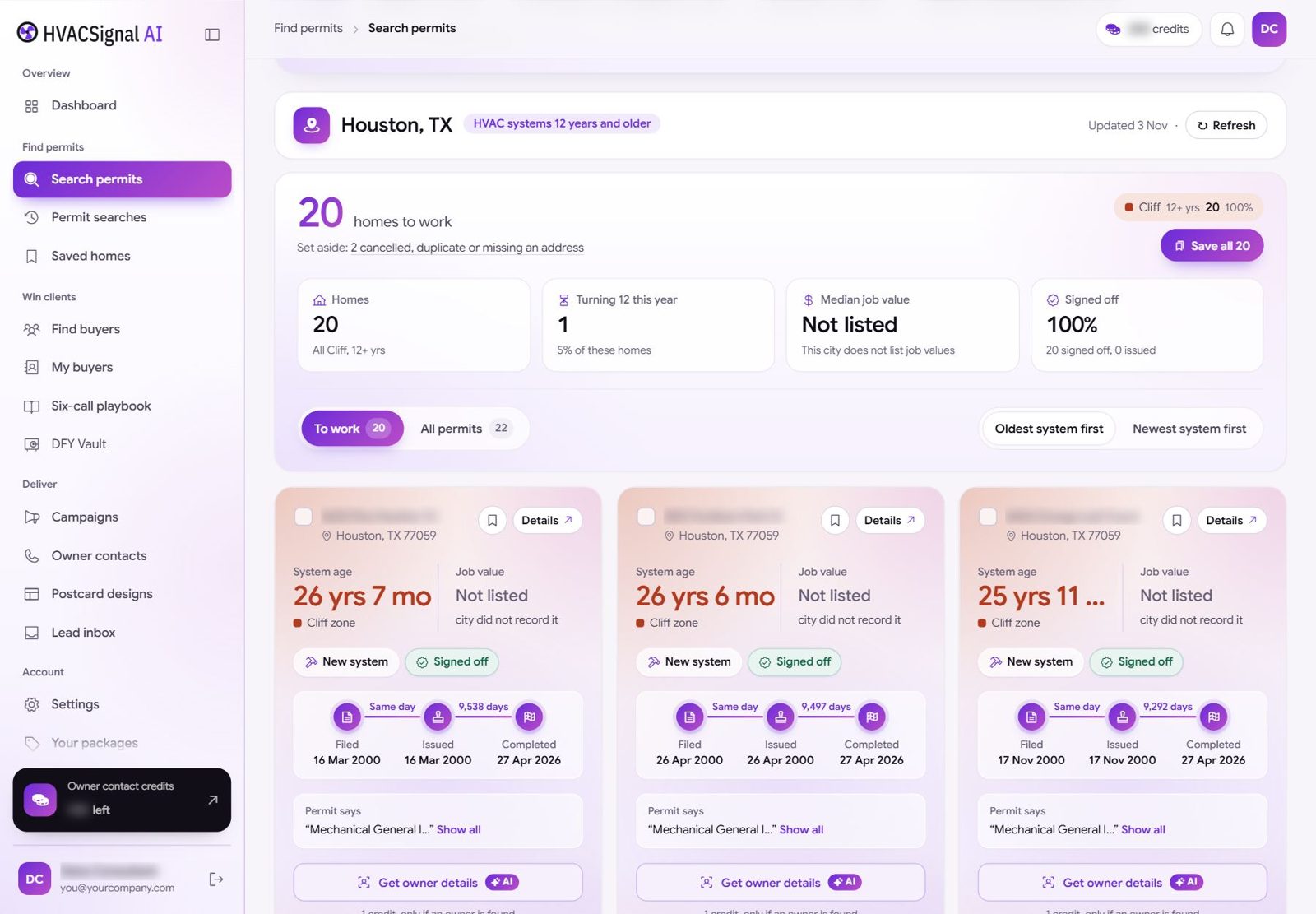
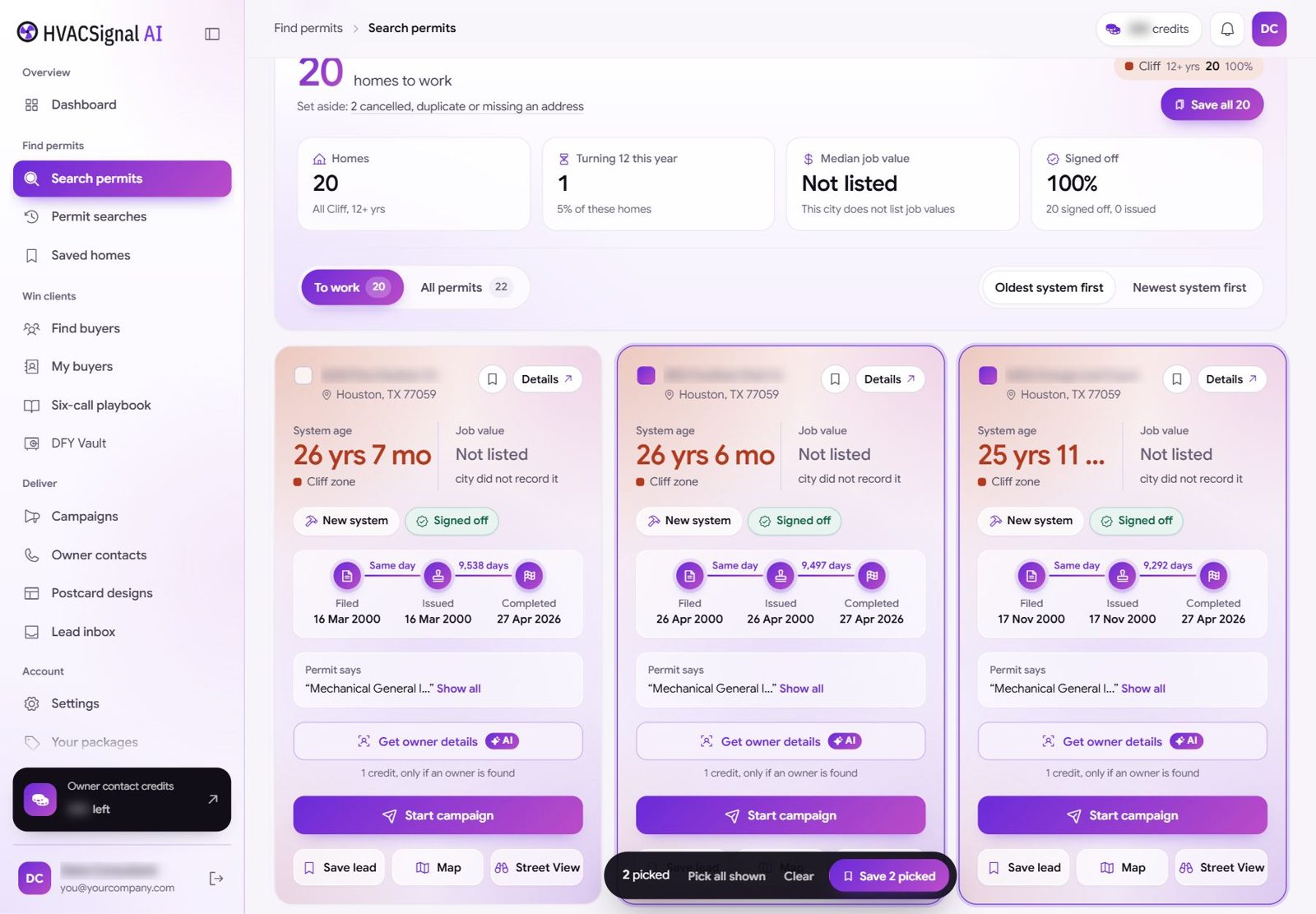
No “typical territory” figures here. This is a real search in the app: Houston, TX, systems 12 years and older, from the beginner guides.
Each card shows the system age to the month, like 26 years 7 months, the filed, issued and completed dates, and the permit wording. The app tells you what it set aside and why.
Your city will be different. Coverage depends on what each city publishes. You run the search and see your own homes before you spend anything on owner contacts or mail, which is rather the point.
Where The First Check Comes From, And When.
Let’s do this with a ledger instead of adjectives, because the number that matters is not what the software costs. It is what a local business pays you, and why it says yes.
A change-out is a big ticket
One extra system replacement a month pays for the whole retainer, and the Cliff list is the shortest path to the next one they did not have to chase.
Spring and fall are quiet
HVAC lives on the weather. System checks on Watch and Settled homes fill the shoulder season instead of waiting for the next heatwave.
Reset homes renew
A newer system is the right moment for a maintenance plan or a warranty, and those renew every year. Different homes from the contractor, no conflict.
An illustrative pricing model built from the default packages in the app’s Your packages page (Cliff list $750 a month; Milestone drops $1,500 a month plus $1,500 setup; Full HVAC Clock $2,500 a month plus $1,500 setup). A package is what a contractor gets from you each month. You set the price, and you collect it. Not typical results, and not a promise of income.
The honest line
First money in seven to fourteen days if you make six phone calls. If you make zero phone calls, this does nothing at all, and you should not buy it.
Two Seconds Between The Mailbox And The Bin.
What gets a homeowner to keep the card is not fear, and it is not “spring tune-up special”. It is one checkable fact about their own house, and a clear next step, from a local company with a name.
City records show an HVAC permit here from 2013.
That makes the system about 13 years old. Most homeowners never see that date. We thought you should have it before summer, not after.
We are a licensed HVAC company in [City]. We will check your system, tell you plainly how it is doing, and give you a written report either way.
Scan to book a time that suits you
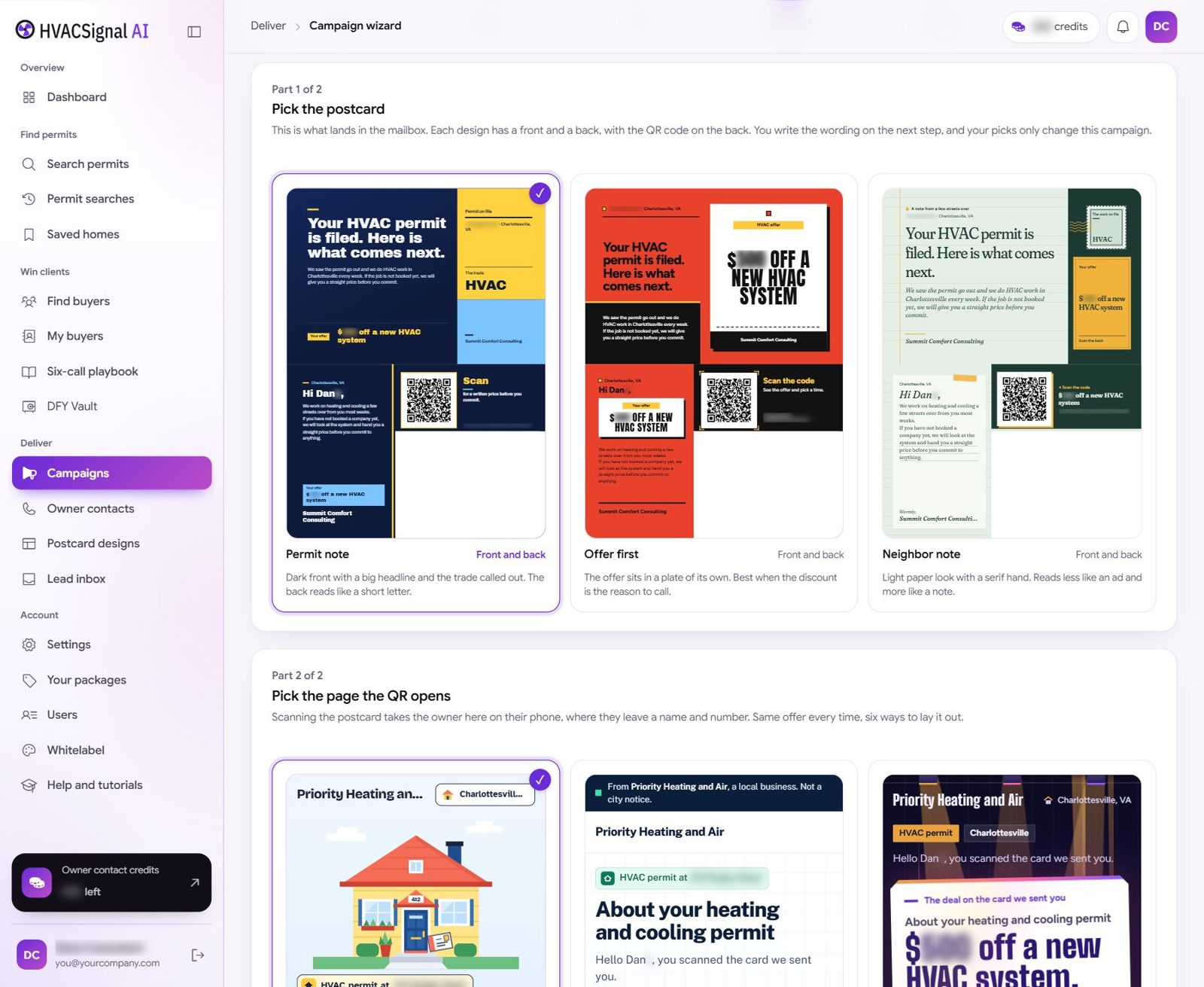
A sample of record-first wording. You and your buyer edit every line in the campaign wizard.
- Lead with the record, not a guess about the system
- Offer a check, never a diagnosis. A permit date says when work was recorded, not how a system runs today
- The contractor’s name, address and license on every card
- A QR to a page in their name, where the owner asks for a callback
Mail, Email And A Phone Call, Done The Safe Way.
Three ways to reach people, and every one is built so your client never has to explain themselves.
The postcard
A six-step campaign: pick the buyer, tick the homes, send the buyer a private pitch page, pick a card, write the message, submit. Nothing prints until the buyer approves the card in their portal. Cards go out through Lob or Thanks.io on your own account.
The email
Pitch your buyers from your own mailbox, set once in Settings. Every outreach email carries a one-click unsubscribe, and opt-outs are kept for good.
The phone call
A person picks up a phone and dials. The app shows which numbers are clean to call and when, gives you the opening line, and logs the result. There is no autodialer and no texting.
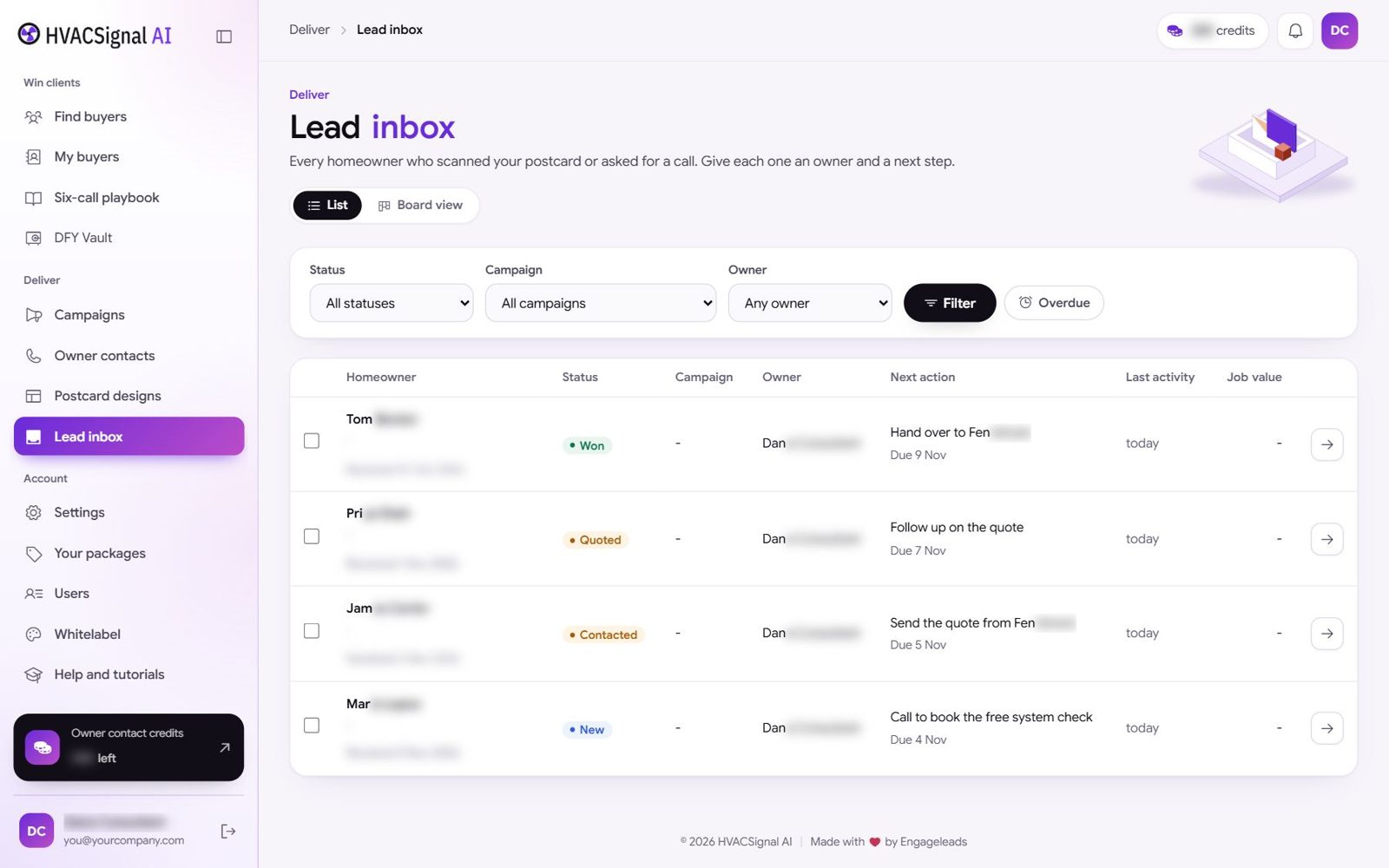
The homeowner scans the QR, lands on a page in the contractor’s name and asks for a callback. It lands in your Lead inbox, in a list or on a board, with a status, an owner and the next step.
Mark a lead Won with its job value and the buyer sees exactly what they paid for. That is what keeps a retainer alive.
Four Reasons To Close This Page.
Not false modesty. Better you hear these from us now than find them out later.
You want a green button
Something that makes money while you watch. This is not that. It is a tool that makes six phone calls unusually easy. It cannot make them for you.
You want a one-off list
The value is the monthly list and the contractor who pays for it every month. If you want to sell one spreadsheet and walk away, there are cheaper ways to do that.
You want to diagnose systems
You can’t, and neither can the app. A permit date says when work was recorded. You sell the list and the campaign to licensed contractors, who do the checking.
You want to scare people
“Your AC is about to die” mail gets binned and gets complaints. The templates lead with one fact and a fair offer. If fear is the plan, this is the wrong tool.
What You Actually Get.
The HVAC Clock search
Any city, ZIP or address, four system ages, newest replacement per address, an age on every home. 300 searches, and reopening a past search is free.
Zone lists and Saved homes
Cliff, Turns 12, Settled and Reset, address by address, with the source permit on every card. Saved homes stay saved.
The permit reader
Change-outs kept, repairs and service calls dropped, and the equipment type where the city records it.
Find buyers and My buyers
Local businesses near your homes, saved with stages and a call log for every one.
The Six-call playbook
Who to call first, the opening line, deals and objection answers.
Owner contacts
250 credits to start. Name, best phone with call times, best email. One credit only when an owner is found.
Campaigns, pitch pages and postcards
The six-step wizard, a private pitch page per buyer you edit line by line, and ready postcard designs with a QR.
Lead inbox and the buyer portal
Every reply with a status and next step. Your buyer signs in to approve cards and open their monthly pack.
Your packages and monthly packs
Three buyer packages you rename and price, and PDFs built on the 1st of every month for each buyer.
Eight beginner guides and support
Every click shown on screen, from your first search to your mail house key. Support Monday to Friday, 9am to 6pm Eastern.
See your city’s homes before you spend on anything else
We can’t promise what an HVAC contractor in your town will sign, and anyone who does is guessing. What we can do is make sure you see whether the data is there first. Your first search shows the homes, the zones and what was set aside, before you spend a single credit on owner contacts or a cent on mail.
After that, the only thing that decides whether this works is whether you send the pitch page to six local businesses and make the calls.
One Town. One Clock. A Monthly Retainer.
The price you pay is not the price you charge. $87 in. A $1,500 audit and a monthly retainer out. Different numbers doing different jobs.
HVACSignal AI: The HVAC Clock
Every heating and cooling system in your market, how old it is, and who will pay you to reach it
What you get
- The HVAC Clock search, four system ages, newest replacement per address
- 300 HVAC searches. Reopening a past search is free
- 250 owner-contact credits, used only when an owner is found
- Find buyers, My buyers and the Six-call playbook
- Campaign wizard, pitch pages and postcard designs
- Lead inbox and buyer portal, with monthly packs
- Your packages, three you rename and price
- Eight beginner guides and email support
Find buyers runs on your own Google Places key. Postcards print through your own Lob or Thanks.io account, billed by them to you or your client, never marked up by us. This is a software license, not an exclusive territory.
The Questions That Actually Get Asked.
Is this just a permit tool with a filter on it?
Permits are the plumbing, not the product. Anybody can download them. The product is the Clock: the newest replacement at every address, change-outs separated from repairs, an age and a zone on every home, the buyers who pay for each zone, and the campaign around it. A filter takes a weekend. This did not.
How do I know my city has a clock?
Search it. Coverage depends on what each city or county publishes. You see the homes, the zones and what was set aside before you spend anything on owner contacts or mail.
Why 12 years?
At 12 years and up a system is near the end of its working life, so it is the age HVAC contractors want most. Homes that turn 12 this year are next in line. You can also search 8 to 11 years for service plans and 0 to 7 years for maintenance and warranties.
I don’t know anything about HVAC. Is that a problem?
It is the normal starting point. You are not checking systems or quoting jobs. You sell a list and a campaign to people who do. The playbook and the beginner guides cover what to say and where to click.
What else will I pay for?
Your own Google Places key for Find buyers, billed by Google to your Google Cloud account. Your own Lob or Thanks.io account for postcards, usually funded by your client. Guides 07 and 08 walk you through both in about ten minutes each.
What happens when my owner-contact credits run out?
You start with 250. Your credits show at the top of every page, and My access on your profile shows searches and credits used. Contact support inside the app to add more.
Can I call and text these homeowners?
You can call numbers the app shows as callable, at the times it shows. Do Not Call and litigator numbers are struck out. There is no autodialer and no texting. Most campaigns lead with a postcard in the contractor’s name.
Can I use it for clients?
The front end is for your own use. To give clients their own sign in and put your brand on the app, add the Agency License on the next page.
Every HVAC System Has A Clock. Somebody Should Read It First.
That is the whole thing, really. Thousands of homes in a single city, each with a start date sitting in a public file. The homeowner does not know it. The local HVAC contractors who could help have no way of finding those homes on purpose. They take whichever ones happen to call on the hottest day of the year.
Every month, another batch of systems in your town crosses 12. Every January, a whole year more. The list does not run out. It arrives on schedule.
You are going to be the person who hands a local contractor that schedule, with your name on the cover.
Launch price. It moves to $197 when the launch closes.